Why Websites Reject Your Password
Published September 27, 2026
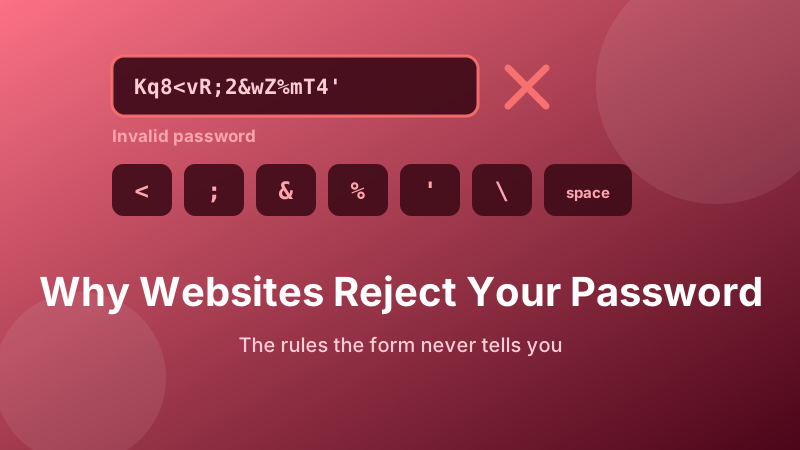
You generate a 24-character password, paste it into a sign-up form, and the site tells you it is invalid. No explanation. You try another. Also invalid. Meanwhile the site would have happily accepted Password1!.
This is not you doing something wrong. It is a collision between a modern password and a system built before anyone expected one. Here is what these forms are actually objecting to, in rough order of likelihood, and how to get past each one without weakening what you are doing.
Generate a password that will pass
Toggle symbols off and set the length to 16, and you get a strong password that clears almost every awkward sign-up form. Runs entirely in your browser.
Open the Password Generator →Cause 1: a symbol the site refuses
The most common culprit by a wide margin. Certain characters have special meaning in the technologies behind the form, and rather than handle them correctly, older systems reject or silently strip them. The frequent offenders:
- Space — often trimmed from both ends, sometimes rejected outright. Never trust a password with a leading or trailing space.
- Single and double quotes (
'") — these terminate strings in database queries. A site that blocks them may be admitting it does not escape input properly. - Angle brackets (
<>) — blocked by filters that are guessing at cross-site-scripting protection. - Semicolon and backslash (
;\) — command and escape characters. - Ampersand and percent (
&%) — these have meaning in URLs and in SQL pattern matching.
Characters that pass nearly everywhere: ! # $ * - _ + = ? @ . If you want a symbol-bearing password that will not fight you, restricting yourself to those is a reasonable compromise.
Cause 2: an unstated maximum length
The form says "at least 8 characters" and says nothing about a ceiling — but there is one, and your 32-character password exceeded it. Sometimes the field simply stops accepting keystrokes, which is at least honest. Sometimes it accepts the whole thing and rejects it on submit. And sometimes, worst of all, it accepts it and quietly cuts it short.
There is no good reason for a low maximum. Passwords should be hashed on receipt, and a hash is a fixed size regardless of input length — a 200-character password and a 10-character one produce the same 60-byte result. So a 12-character ceiling tells you something is storing the password itself in a sized column, which is a red flag about everything else on that site.
Cause 3: silent truncation, the bug that locks you out
Worth its own section because the symptom is so confusing: the password works when you set it, then fails when you log in. You are certain you typed it right. You did.
What happened is that the sign-up code stored only the first N characters of your password, while the login code compares the full string you typed. Two different code paths, two different assumptions. Your password was silently shortened and now nothing matches.
If you hit this, do not keep retrying — you will trip a lockout. Instead:
- Try logging in with just the first 16 characters of your password, then the first 12, then the first 10. If one works, you have found the site's real limit.
- Whether or not that works, do a password reset immediately and set something within that limit.
- Generate the replacement at the discovered length, letters and digits only, to rule out a second cause.
- Enable two-factor authentication on that account if the option exists.
Cause 4: composition rules you are accidentally breaking
"Must contain one upper case, one lower case, one number and one special character." A random 16-character password usually satisfies all four by chance — but not always. Roughly one generated password in twenty will happen to contain no digit, or no upper case letter, and the form will reject it with a message that looks like a general complaint rather than a specific miss.
Some rules are stranger still and go unmentioned until you violate them: no three identical characters in a row, must not start with a number, must not contain part of your email address, must differ from your last five passwords by more than two characters. If a generated password is rejected and symbols are not the issue, simply generate another one. The second attempt usually passes.
Cause 5: the password appeared in a breach
A better class of rejection, and increasingly common. Good sites now check submitted passwords against databases of billions of credentials exposed in past breaches, using a privacy-preserving method that sends only a partial hash. If a site rejects a password you invented yourself as "too common" or "previously exposed", it is doing its job — that password is on a list attackers already have.
This never happens to a properly generated random password, because it has never existed before. If you are seeing this error, it is a strong signal to stop composing passwords by hand.
The setting that solves most of this
When a form is being difficult, the fastest reliable path is to remove symbols from the equation entirely:
- Open the Password Generator.
- Uncheck Symbols. Leave upper case, lower case and numbers on.
- Set the length to 16. If the site has already refused 16, drop to 12.
- Generate, check by eye that there is at least one capital and one digit, and copy.
- Paste it into your password manager first, then into the form.
You lose barely anything by dropping symbols. Sixteen characters of letters and digits is about 95 bits of entropy, comfortably past the point where guessing is a realistic attack. Two extra characters more than recovers the difference — and this is the deeper point about composition rules: length is the cheap resource, and trading a troublesome character class for a couple more characters is almost always the right trade.
What good password rules look like
For context on why so many of these forms feel wrong, current guidance from NIST tells sites to do close to the opposite of what they mostly do. The recommendations are to accept a minimum of 8 characters and allow at least 64, accept all printable characters including spaces and Unicode, drop mandatory composition rules, drop periodic expiry, and check new passwords against breach lists instead.
The reasoning is behavioural. Composition rules and 90-day expiry do not produce unpredictable passwords; they produce Spring2026! followed by Summer2026!. Removing the rules and allowing long input lets people use password managers, which is what actually works. A site that still demands one symbol and a quarterly change has not updated its thinking in a decade.
Is generating a password here private?
Yes. Every password from the Toolyard generator is created inside your own browser using its cryptographic random source, and is never uploaded anywhere — no server, no account, no logs. You can generate a dozen until one satisfies a stubborn form and not one of them leaves your device.
Get one that the form will accept
Letters and digits, 16 characters, one click. Free, private and no sign-up.
Open the Password Generator →