Instagram Post Size 2026: 1080×1350 vs Square vs 3:4
Published September 29, 2026
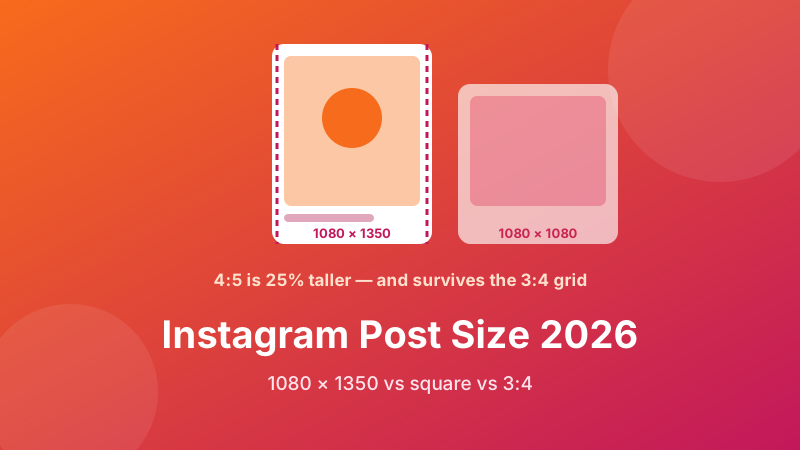
Short answer: make your Instagram feed posts 1080 × 1350 pixels. That is a 4:5 portrait shape, and in 2026 it is the right default for almost everything you put in the feed — photos, quote graphics, product shots and carousel slides.
The longer answer matters because Instagram now shows each post in two different shapes: one in the feed and another on your profile grid. A size that looks perfect in one can lose its edges in the other. This guide covers only feed posts (Stories, Reels and profile pictures have their own guides), explains why 4:5 wins, and shows exactly what gets cropped where.
Resize any photo to 1080×1350 in one click
Pick the Instagram Portrait preset, drop in your photos, download. It runs in your browser — nothing is uploaded, no sign-up, no watermark.
Open the Social Media Resizer →The three feed shapes Instagram accepts
The feed accepts any shape between a wide 1.91:1 landscape and a tall 4:5 portrait. In practice there are three sizes worth using:
| Shape | Pixels | Ratio | Feed height vs square |
|---|---|---|---|
| Portrait | 1080 × 1350 | 4:5 | +25% taller |
| Square | 1080 × 1080 | 1:1 | baseline |
| Landscape | 1080 × 566 | 1.91:1 | about half as tall |
The width stays at 1080 pixels in every case. Only the height changes, and height is what you are really choosing, because height decides how much of the phone screen your post occupies while someone scrolls past it.
Why 4:5 portrait beats square
Every post in the feed is shown at the full width of the phone. So a taller post is simply a bigger post. A 4:5 image is 25% taller than a square and roughly two and a half times taller than a 1.91:1 landscape. On a typical phone, a portrait post fills most of the screen; a landscape post leaves room for the next post to peek in and pull attention away.
That extra height is free. It costs no reach and no money, and it gives your picture more time on screen as the thumb slows down. This is why most brand accounts and photographers switched to 4:5 as their default years ago, and why it remains the recommendation in 2026.
Square is not wrong. It is a fine choice for graphics you also want to reuse on Facebook or LinkedIn, or when your design is naturally symmetrical. You just leave a slice of screen on the table.
The 3:4 profile grid: what changed
In early 2025 Instagram changed the profile grid from squares to 3:4 rectangles — slightly taller than they are wide. Your feed post is not changed; only its thumbnail on your profile is cropped to fit the new tile. Here is what each post shape loses on the grid:
| You posted | Grid tile shows | What is cut |
|---|---|---|
| 4:5 (1080×1350) | 1012×1350 centre | ~34 px off each side — barely noticeable |
| 1:1 (1080×1080) | 810×1080 centre | 135 px off each side — a quarter of the width |
| 1.91:1 (1080×566) | ~425×566 centre | More than half the image |
This is the strongest new argument for 4:5. It is the only feed shape that looks essentially the same in the feed and on the grid. A square quote graphic with text running to the edges can lose the first and last letters of each line on your profile; the same design laid out at 4:5 survives intact.
A practical design rule follows: keep text and faces inside the central 75% of the width. That safe area is visible in the feed, in the grid and in most share previews.
Instagram has also begun accepting 3:4 uploads (1080×1440) in some versions of the app. Support has rolled out unevenly, so if you post 3:4 and your app offers only 4:5 in the crop screen, that is why. 4:5 remains the universally safe choice.
Why Instagram crops some photos
Anything outside the 1.91:1 to 4:5 range gets cropped when you upload. The usual suspects:
- Phone camera photos in portrait (3:4). Slightly taller than 4:5, so a strip goes from the top and bottom.
- DSLR and mirrorless photos in portrait (2:3). Much taller than 4:5; about 17% of the height is lost.
- Phone screenshots (roughly 9:19.5). Very tall; well over a third disappears.
- Panoramas. Wider than 1.91:1; the sides are cut.
You have two ways to avoid losing content. Crop it yourself to 4:5 so you choose what goes, or pad it: shrink the whole image to fit inside a 1080×1350 frame and fill the gaps with a background colour. Padding is the right move for screenshots, charts and anything where every edge matters.
The carousel rule that trips everyone up
A carousel can hold up to 20 photos and videos, but it uses one shape for the whole set — the shape of the first slide. Upload a square first and a portrait photo on slide four is quietly cropped to a square. People discover this after posting, when a face at the top of slide four has lost its forehead.
The fix is simple: resize every slide to the same size before you open Instagram. Batch them all to 1080×1350 in one go and every slide keeps its full frame.
How to make a 1080×1350 Instagram post
- Open the Social Media Resizer and drag in one photo or a whole carousel batch. Files load from your device; nothing is uploaded.
- Choose Instagram Portrait (1080×1350) from the Target size list.
- Pick Cover to fill the frame by trimming the edges evenly from the centre, or Contain to keep the entire image and pad the gaps with a colour you choose — ideal for screenshots and landscape photos.
- Download the images and post them in the order you want. Every slide now shares the same shape, so nothing is cropped.
If your subject sits off-centre, crop it roughly first with the Image Cropper so the important part is in the middle, then run it through the resizer.
Keeping posts sharp after upload
Instagram recompresses every image. You cannot stop that, but you can give it less work to do. Export at exactly 1080 pixels wide so the app does not have to shrink a 4000-pixel photo on its own. Use sRGB colour; wide-gamut files can look washed out after conversion. Save photos as a high-quality JPEG and text-heavy graphics as PNG. And upload over Wi-Fi when you can — on a weak connection the app sometimes sends a lower-quality version and does not tell you.
Quick answers
Best size? 1080×1350, 4:5. Square still fine? Yes, 1080×1080, but it is shorter and crops on the grid. Landscape? Avoid for the feed unless the picture really needs to be wide; 1080×566 is tiny on a phone. Carousel? Resize every slide to the same size first. For Stories and Reels, see Instagram Story & Reels size; for your avatar, see Instagram profile picture size.
Batch-resize a whole carousel
Drop every slide in at once, choose 1080×1350, and download a matching set — free and private, right in your browser.
Open the Social Media Resizer →