How to Convert HEX to HSL (and Why It's Worth It)
Published August 18, 2026
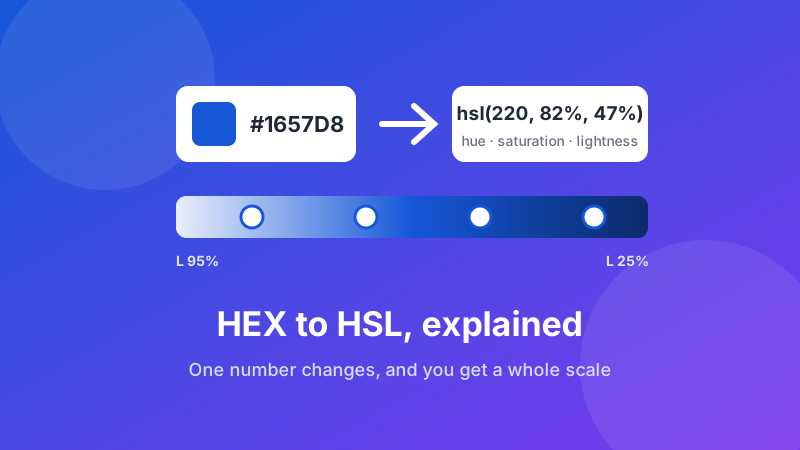
Converting a hex code to HSL takes one paste. #1657D8 becomes hsl(220, 82%, 47%) — the exact same blue, written differently. The interesting question isn't how to do the conversion; it's why you'd bother, and the answer is that HSL lets you do something hex simply can't: change one number and get a predictably lighter, darker, or more muted version of the same color.
This guide covers what the three numbers mean, how the conversion works underneath, and the practical trick that makes HSL worth knowing.
Convert a hex code right now
Paste any hex value and get HSL and RGB instantly, with a live preview. Runs in your browser — free, no sign-up, nothing uploaded.
Open the HEX to HSL Converter →What the three HSL numbers mean
HSL stands for hue, saturation, lightness, and unlike hex it maps onto the way people actually talk about color.
- Hue (0–360) — the position on a color wheel, in degrees. 0 is red, 60 yellow, 120 green, 180 cyan, 240 blue, 300 magenta, and 360 wraps back to red. This is the "which color is it" number.
- Saturation (0–100%) — how vivid it is. 0% is a flat grey regardless of hue; 100% is the most intense version available.
- Lightness (0–100%) — how much white or black is mixed in. 0% is always black, 100% is always white, and 50% is the pure hue. That midpoint catches people out: lightness is not brightness, it's a slider between black and white with the true color at the centre.
So hsl(220, 82%, 47%) reads as: a blue (220°), strongly saturated (82%), sitting just below the midpoint so slightly darker than the pure hue (47%). You can picture that color from the numbers alone, which is not true of #1657D8.
How the conversion actually works
You don't need this to use a converter, but it explains why some results look odd.
A hex code is three pairs of base-16 digits, one per channel: #1657D8 is red 16 (22 in decimal), green 57 (87), blue D8 (216). The conversion first scales those to a 0–1 range, then finds the largest and smallest of the three.
- Lightness is the midpoint of the highest and lowest channel —
(max + min) / 2. - Saturation comes from the gap between them. If max and min are equal there's no gap, saturation is 0, and the color is grey.
- Hue depends on which channel is the highest, then how far the other two sit either side of it. That's what places the color on the wheel.
Two consequences follow. First, any hex code with three identical pairs — #808080, #FFFFFF, #333333 — has zero saturation, and its hue is meaningless (converters usually report 0). Second, because saturation is measured relative to lightness, very dark and very light colors show large saturation percentages for small differences. A near-black navy can report 90% saturation and still look almost black.
The reason to convert: tints and shades
Here's the payoff. Say your brand blue is #1657D8 and you need a light background version and a dark text version of it.
In hex, there's no obvious move. You'd guess at digits, check, adjust, and probably drift into a slightly different color without noticing. In HSL you hold hue and saturation fixed and change lightness alone:
hsl(220, 82%, 95%)— a pale wash, right for a card or callout background.hsl(220, 82%, 85%)— a soft tint for borders and dividers.hsl(220, 82%, 47%)— your original color, for buttons and links.hsl(220, 82%, 35%)— a hover state.hsl(220, 82%, 25%)— dark enough for text on a light background.
Five values, one hue, guaranteed to belong to each other. That's a coherent scale built in about thirty seconds, and it's the standard way design systems generate color ramps.
One refinement worth knowing: very light and very dark steps often look washed out if you keep saturation identical. Nudging saturation up slightly at the extremes — say 82% in the middle, 88% at the ends — keeps the color feeling consistent. That's a judgement call, not a formula.
When to use HSL and when to stick with hex
They're interchangeable, so this is about convenience rather than correctness.
Reach for HSL when you're building a palette from one base color, generating hover and disabled states, muting something by dropping saturation, or writing CSS custom properties where a single hue variable feeds a whole theme. Reach for hex when you're pasting between design tools, recording a brand color in a style guide, or handing a value to a client — hex is the universal currency and every app accepts it.
Plenty of teams do both: store hex as the canonical brand value, convert to HSL to generate the working scale. If you also need RGB — Microsoft Office dialogs and some video editors ask for three separate numbers — the color converter handles all three notations at once, and our RGB vs HEX vs HSL guide compares them side by side.
A note on rounding
Convert hex to HSL and back and you may find one channel has shifted by a value or two. That's expected. Hex stores 256 exact steps per channel, while HSL is normally written with whole-number percentages, so some precision is lost in the round trip. The difference is invisible — you'd need a color meter to detect it — but it's a good reason to keep the hex code as your source of truth for brand colors and treat HSL as a working format.
Converting in the other direction
Going HSL to hex works the same way, and you'll want it once you've built a scale in HSL and need to hand the values to someone using a design tool. The same converter runs both directions. And if you don't have a starting code at all — just a photo or a logo with a color you like — pull the hex out first with the image color picker, then convert. Our guide on getting a hex code from an image covers the picking part.
Is it private and free?
Yes. The HEX to HSL converter does the arithmetic in JavaScript inside your own browser — nothing is sent to a server, there's no sign-up, and there's no limit on how many codes you convert. Load the page once and it keeps working with your internet connection switched off, which is the simplest proof that no data is leaving your machine.
FAQ
How do I convert a hex code to HSL?
Paste the hex value into a converter and read off the three numbers: hue in degrees (0–360), saturation as a percentage, and lightness as a percentage. For example #1657D8 becomes hsl(220, 82%, 47%). Toolyard's HEX to HSL tool does it in the browser with nothing uploaded.
What do the three HSL numbers mean?
Hue is the position on the color wheel in degrees — 0 red, 120 green, 240 blue. Saturation is how vivid the color is, from 0% grey to 100% full intensity. Lightness runs from 0% black through 50% pure color to 100% white.
Is HSL better than HEX for CSS?
Neither is better — they describe identical colors. HSL is easier to reason about, because changing one number gives you a lighter or more muted version. Hex is more compact and pastes cleanly between design tools.
How do I make a lighter or darker version of a color?
Convert to HSL and change only the lightness. Keeping hue and saturation fixed guarantees the result is the same color, just lighter or darker. Around 95% gives a background tint; around 25% gives a dark shade suitable for text.
Do all browsers support HSL colors?
Yes. The hsl() notation has worked in every major browser for well over a decade, including the newer space-separated syntax. There's no compatibility reason to avoid it.
Does converting HEX to HSL lose accuracy?
Slightly, on the round trip. Hex holds 256 exact steps per channel while HSL percentages are usually rounded to whole numbers, so converting back can shift a channel by one or two. It's invisible to the eye, but keep the hex code as your source of truth for brand colors.
Convert your color now
Paste a hex code, get HSL and RGB with a live preview, and copy whichever format you need — free and private.
Open the HEX to HSL Converter →