What Is a UUID (and How to Generate One)
Published July 27, 2026
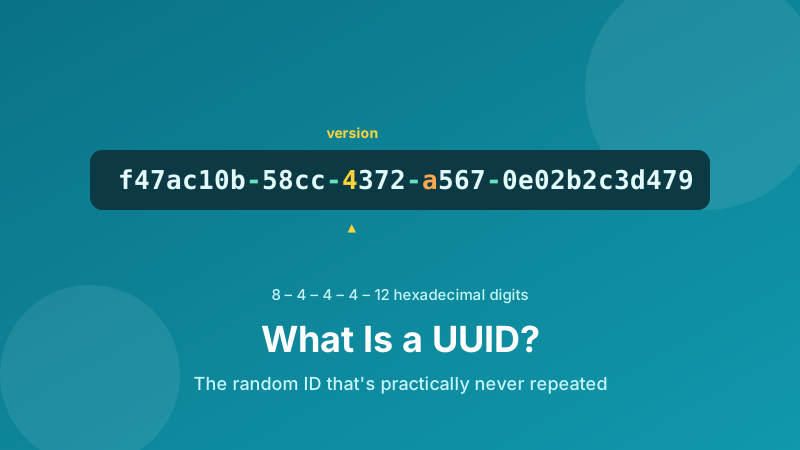
If you've ever poked around a database, an API response, or a config file, you've probably seen a string like f47ac10b-58cc-4372-a567-0e02b2c3d479 and wondered what it is. That's a UUID — a Universally Unique Identifier. It's a label that developers use to name a thing (a user, an order, a file, a session) with near-total confidence that no other thing anywhere will ever get the same label. This guide explains what a UUID is in plain English, how the most common kind is built, and how to generate one for yourself.
Generate a UUID now
Create one random version 4 UUID or a whole batch — uppercase or without hyphens if you need it. It runs in your browser, and nothing is uploaded.
Open the UUID Generator →What a UUID actually is
A UUID is a 128-bit number, almost always written as 36 characters: 32 hexadecimal digits split into five groups by hyphens, in the pattern 8-4-4-4-12. So it looks like xxxxxxxx-xxxx-xxxx-xxxx-xxxxxxxxxxxx. You'll also hear it called a GUID (Globally Unique Identifier) — that's Microsoft's name for the exact same thing, so the two words are interchangeable.
The whole point of a UUID is in the middle word: unique. The idea is that you can generate one on your laptop, someone else can generate one on a server in another country, and the two will (practically) never clash — without either of you having to check with a central authority first. That "no coordination needed" property is what makes UUIDs so useful across distributed systems.
Why would you use one?
The classic alternative to a UUID is a plain counter: 1, 2, 3, 4… Auto-incrementing numbers are simple, but they have real drawbacks that UUIDs solve:
- No central counter. Two servers can both create records offline and merge later without their IDs colliding — impossible with a shared counter.
- Generate the ID before you save. Your app can create a UUID for a new record instantly, on the client, before it ever talks to the database.
- Harder to guess. Sequential IDs leak information — if your order is
#1043, a competitor knows roughly how many orders you've had, and can try#1044. A random UUID reveals nothing and can't be walked through. - Merge-friendly. Importing data from another system rarely causes ID conflicts, because the odds of two UUIDs matching are astronomically small.
Version 4: the random kind
There are several "versions" of UUID, but the one you'll meet most often — and the one most tools generate by default — is version 4, which is built almost entirely from random numbers. You can actually read the version straight out of the string. In a v4 UUID, the first character of the third group is always 4, and the first character of the fourth group is one of 8, 9, a, or b. Look back at the example: f47ac10b-58cc-4372-a567-0e02b2c3d479 — there they are.
Everything else is random. That's it — no timestamp, no MAC address, no hidden meaning. A version 4 UUID is essentially a very large, well-formatted random number with two fixed markers that identify it as a v4.
"Universally unique" — but can two ever match?
In theory, yes; in practice, no. A version 4 UUID has 122 random bits, which works out to about 5.3 × 1036 possible values — more than five undecillion. To put that in perspective: you'd have to generate a billion UUIDs every second for around 85 years just to reach a 50% chance of a single duplicate anywhere. For any normal application, the risk of a collision is so small that engineers simply treat it as zero. That's why you can generate UUIDs freely without ever checking whether one already exists.
How to generate a UUID in Toolyard
The Toolyard UUID Generator is free, needs no account, and creates every ID inside your browser — nothing is sent to a server. Here's how to get one (or a hundred):
- Open the UUID Generator. A fresh version 4 UUID appears right away.
- Need several? Set how many you want and generate them in bulk — handy for seeding test data or a batch of records.
- Choose your formatting: switch to uppercase, or drop the hyphens, depending on what your database or code expects.
- Click to copy a single UUID, or copy the whole list at once.
- Paste it wherever you need it — a database row, an API request, a config file, or a test.
Because every ID is generated locally with your browser's built-in cryptographic randomness, the results are genuinely random and never leave your device.
A few practical tips
- Casing rarely matters, but be consistent. UUIDs are usually written in lowercase. Some systems compare them as plain text, so pick one style and stick to it to avoid "same ID, different case" bugs.
- Storing many? Consider the format. As text a UUID takes 36 characters; databases often store it more compactly as a 16-byte binary type. For a spreadsheet or a quick script, the plain hyphenated string is perfectly fine.
- Don't use it as a secret. A v4 UUID is unpredictable enough for an ID, but it isn't a password or a security token — treat it as a public name, not a private key.
- Hyphen-free versions are handy for filenames, URL slugs, or systems that dislike dashes — the tool can strip them for you.
Is it private and free?
Yes. The Toolyard UUID Generator is 100% private because every identifier is created in your browser with JavaScript — nothing is uploaded to any server, so the IDs you generate are seen by you alone. It's completely free with no sign-up, works in bulk, and keeps running even offline once the page has loaded.
Working with more developer tools?
Need to inspect a JSON payload while you're at it? The JSON Formatter tidies and validates any JSON in your browser — free and private.
Open the JSON Formatter →Ready to generate one?
Create a single random v4 UUID or a full batch in seconds — free, private, and copy-ready.
Open the UUID Generator →